Go From Zero, Part 1: Why Go, Setting It Up, and Your First Program
This is Part 1 of 12 in Go From Zero, a beginner-to-production series on the Go programming language. You are at the very beginning, which is a great place to be.
A few years ago I joined a team where almost everything ran on Go. I came from a world of heavy frameworks and long build times, and I expected the usual learning curve. Instead, I was shipping small fixes in my first week. Not because I’m clever, but because Go is small. There just isn’t that much language to learn.
That’s the promise of this series. Over 12 posts we’ll go from “what is Go?” to building a real REST API, and along the way I’ll show you the habits that experienced Go developers follow without thinking about them. Every post links to the one before and after it, so you can read straight through like a book.
Today we keep it simple: why Go exists, how to install it, and how to write, run and build your first program.
Why Go exists
Go was designed at Google around 2007 by Robert Griesemer, Rob Pike and Ken Thompson, and released as open source in 2009. The story goes that they started sketching it while waiting for a huge C++ program to compile.
They wanted a language that:
- Compiles fast. Big projects build in seconds, not minutes.
- Is easy to read. You should be able to open any Go codebase and follow it, even if you didn’t write it.
- Makes concurrency practical. Modern servers handle thousands of things at once, and the language should help with that instead of fighting it.
- Produces a single binary. No runtime to install on the server, no dependency hunting. Copy one file and run it.
Those goals explain nearly every design decision you’ll meet in this series. When something in Go feels “too simple”, it’s usually on purpose.
Where Go shines
You’ve already used software written in Go, probably today. Docker, Kubernetes, Terraform, Prometheus, Grafana’s backend, Hugo and CockroachDB are all written in it. Go is especially popular for:
- Web servers and APIs
- Command-line tools
- Cloud and infrastructure tooling
- Networking services and proxies
- Data pipelines and background workers
It’s less common for things like mobile apps, desktop GUIs or heavy data science, where other ecosystems are stronger. Knowing where a tool fits is part of using it well.
Installing Go
Head to the official download page at go.dev/dl and grab the installer for your operating system. Always pick the latest stable version. Go keeps strong backward compatibility, so newer is almost always better.
On macOS you can also use Homebrew:
brew install go
On Linux, the official tarball is usually the safest choice, because distro packages can lag behind:
# replace the version with the latest one from go.dev/dl
wget https://go.dev/dl/go1.24.7.linux-amd64.tar.gz
sudo rm -rf /usr/local/go
sudo tar -C /usr/local -xzf go1.24.7.linux-amd64.tar.gz
echo 'export PATH=$PATH:/usr/local/go/bin' >> ~/.profile
Then open a new terminal and check it worked:
go version
# go version go1.24.7 darwin/arm64 (yours may differ)
If you see a version number, you’re ready.
Editor tip: Install VS Code with the official Go extension, or use GoLand. Both give you autocompletion, inline errors and automatic formatting through gopls, the official Go language server. It makes learning much easier because the editor catches mistakes as you type.
Your first program
Make a folder and initialise a module. A module is just Go’s word for “a project with a name and a list of dependencies”. We’ll cover modules properly in Part 6.
mkdir hello && cd hello
go mod init example.com/hello
That creates a tiny file called go.mod. Now create main.go:
package main

import "fmt"

func main() {
    fmt.Println("Hello, Gopher! 👋")
}
Run it:
go run .
# Hello, Gopher! 👋
That’s a complete Go program. Let’s read it line by line, because every Go file follows this same shape.
package mainsays which package this file belongs to. A package namedmainis special: it builds into a program you can run, rather than a library.import "fmt"pulls in thefmtpackage from the standard library. It handles formatted input and output.func main()is the entry point. When your program starts, Go callsmain, and whenmainreturns, the program ends.fmt.Printlnprints a line. Notice it starts with a capital letter. In Go, capitalised names are exported (public). Lowercase names stay private to their package. Nopublicorprivatekeywords needed.
From source code to a binary
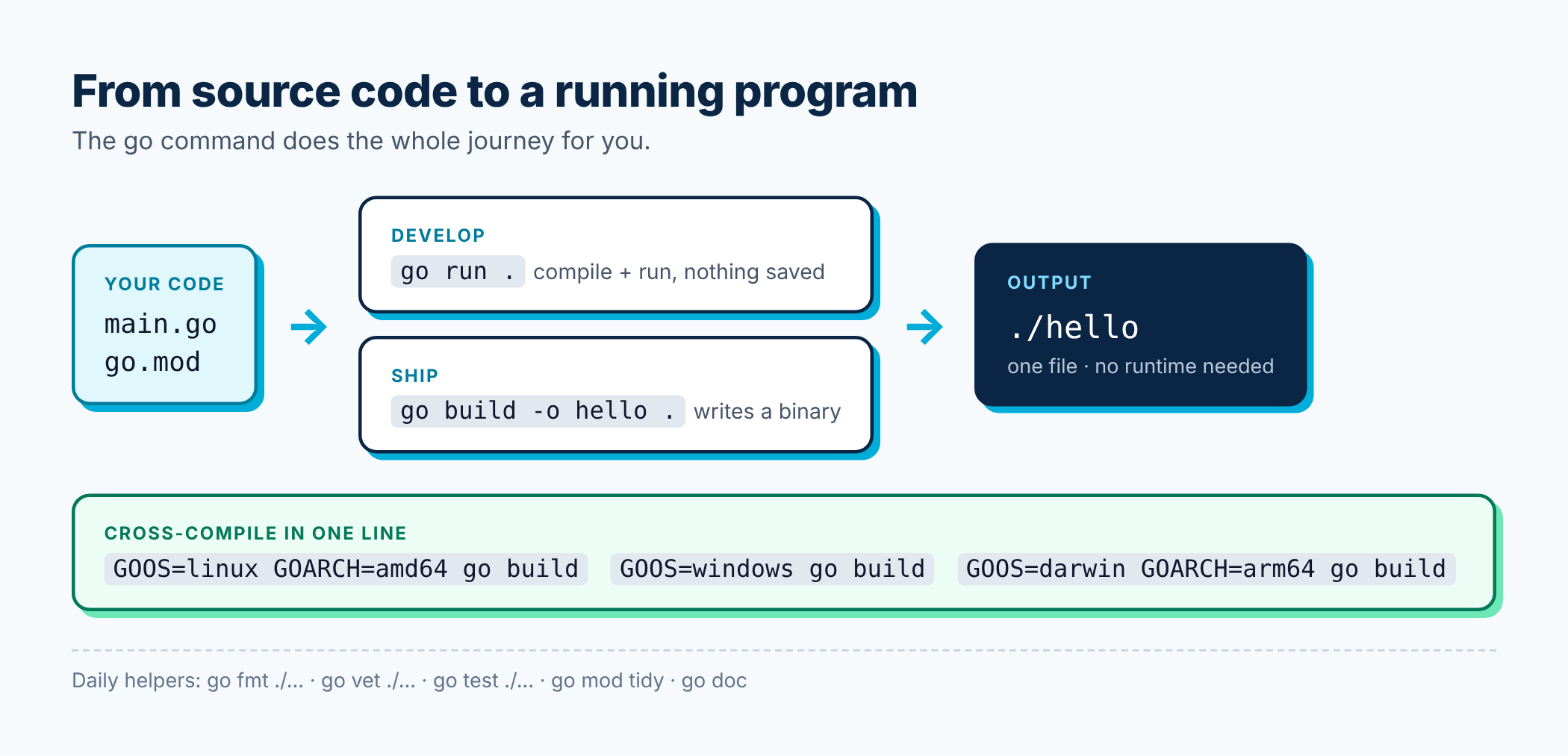
go run compiles and runs in one step, which is great while you’re developing. When you want something you can ship, use go build.
go build -o hello .
./hello
# Hello, Gopher! 👋
The hello file is a standalone executable. You can copy it to another machine with the same OS and CPU type and it just runs, with nothing else installed.
Want to build for a different platform? Set two environment variables:
GOOS=linux GOARCH=amd64 go build -o hello-linux .
GOOS=windows GOARCH=amd64 go build -o hello.exe .
Cross-compiling is built in. In many languages that’s an afternoon of pain. In Go it’s one line.
A slightly more interesting program
Let’s make something that takes input and does a bit of work, so it feels less like a ritual.
package main

import (
    "fmt"
    "os"
    "strings"
)

func main() {
    name := "stranger"
    if len(os.Args) > 1 {
        name = strings.Join(os.Args[1:], " ")
    }

    greeting := fmt.Sprintf("Hello, %s!", name)
    fmt.Println(greeting)
    fmt.Println("Your greeting has", len(greeting), "characters.")
}
go run . Sahil
# Hello, Sahil!
# Your greeting has 13 characters.
A few new things here:
- When you import more than one package, you group them in parentheses.
os.Argsis a list of command-line arguments. The first one is the program itself, so we skip it withos.Args[1:].name := "stranger"declares a variable and gives it a value in one go. Go works out the type for you. We’ll go deep on this in Part 2.fmt.Sprintfformats a string without printing it.%sis a placeholder for a string.
The Go toolbox you get for free
One of my favourite things about Go is that the go command ships with everything you need day to day. No extra installs.
go run .compiles and runs your program.go buildproduces a binary.go fmt ./...formats all your code in the official style.go vet ./...spots suspicious code, like wrong format verbs inPrintf.go test ./...runs your tests (Part 10).go mod tidyadds missing dependencies and removes unused ones (Part 6).go doc fmt.Printlnshows documentation right in your terminal.
The ./... pattern means “this folder and everything under it”. You’ll type it a lot.
Best practices to start with on day one
These habits cost nothing now and save a lot of pain later.
1. Let gofmt decide your style. Go has one official format, and the whole community uses it. Tabs vs spaces, brace placement, alignment: all decided. Set your editor to format on save and never think about it again. As Rob Pike put it, gofmt’s style is no one’s favourite, yet gofmt is everyone’s favourite.
2. Run go vet often. It catches real bugs, not just style issues.
3. Don’t fight the compiler about unused things. Go refuses to compile if you import a package you don’t use or declare a local variable you never read. It feels strict at first. After a week you’ll be grateful, because it keeps code clean.
4. Read the standard library. Go’s standard library is excellent and very readable. Before you reach for a third-party package, check whether net/http, encoding/json, strings or friends already do the job.
5. Use the Go Playground to try ideas quickly in the browser. It’s also great for sharing a snippet when you ask for help.
Common beginner stumbles
- “declared and not used”: you created a variable and never used it. Use it, or remove it.
- “imported and not used”: same idea, for imports. Most editors remove these automatically on save.
- Opening brace on a new line. Go needs
func main() {with the brace on the same line. This is because Go inserts semicolons automatically at line ends, and a lone{on the next line would break things. **go: cannot find main module**: you’re running a command outside a folder that has ago.mod. Rungo mod initfirst.
Recap
- Go was built for fast builds, readable code, easy concurrency and simple deployment.
- Install it from go.dev/dl and check with
go version. - Every runnable program has
package mainand afunc main(). - Capitalised names are exported; lowercase names are private.
go run,go build,go fmt,go vetandgo testcover most of your daily work.
Try this before the next part: extend the greeting program so it prints the greeting in uppercase too. Hint: look at strings.ToUpper using go doc strings.ToUpper.
In Part 2 we’ll learn the building blocks you’ll use in every Go file: variables, types, if, for, switch and functions, including Go’s habit of returning more than one value.
Where to go from here
➡️ Next: Part 2: Variables, Types, Control Flow, and Functions
The full Go From Zero series
- Part 1: Why Go, Setting It Up, and Your First Program (you are here)
- Part 2: Variables, Types, Control Flow, and Functions
- Part 3: Arrays, Slices, Maps, and Structs
- Part 4: Methods, Interfaces, and Composition
- Part 5: Error Handling the Go Way
- Part 6: Packages, Modules, and Project Layout
- Part 7: Goroutines, Channels, and select
- Part 8: sync, context, and Concurrency Patterns
- Part 9: Generics Without the Headache
- Part 10: Testing, Benchmarks, and Fuzzing
- Part 11: Best Practices for Production-Ready Go
- Part 12: Building a REST API with the Standard Library
If this helped you, share it with a friend who is learning Go, or subscribe to get the next posts by email. Questions are welcome in the comments.
Releted Posts
Go From Zero, Part 12: Building a REST API with the Standard Library
This is Part 12 of 12 in Go From Zero, a beginner-to-production series on the Go programming language. If you missed it, Part 11: Best Practices for Production-Ready Go is the place to catch up.
Read more
Go From Zero, Part 11: Best Practices for Production-Ready Go
This is Part 11 of 12 in Go From Zero, a beginner-to-production series on the Go programming language. If you missed it, Part 10: Testing, Benchmarks, and Fuzzing is the place to catch up.
Read more
Go From Zero, Part 10: Testing, Benchmarks, and Fuzzing
This is Part 10 of 12 in Go From Zero, a beginner-to-production series on the Go programming language. If you missed it, Part 9: Generics Without the Headache is the place to catch up.
Read more