Go From Zero, Part 3: Arrays, Slices, Maps, and Structs
This is Part 3 of 12 in Go From Zero, a beginner-to-production series on the Go programming language. If you missed it, Part 2: Variables, Types, Control Flow, and Functions is the place to catch up.
In Part 2 we worked with single values: one number, one string. Real programs deal with lists of users, lookups by ID and records with many fields. That’s what today is about.
Go keeps this part small too. There are four things to learn: arrays, slices, maps and structs. Slices deserve the most attention, because once you understand how they work inside, a whole class of confusing bugs simply disappears.
Arrays: fixed size, rarely used directly
An array has a fixed length that’s part of its type. [3]int and [4]int are different types.
package main

import "fmt"

func main() {
    var scores [3]int // [0 0 0]
    scores[0] = 90
    primes := [5]int{2, 3, 5, 7, 11}
    fmt.Println(scores, primes, len(primes))

    copyOfPrimes := primes // arrays are values: this copies all 5 ints
    copyOfPrimes[0] = 100
    fmt.Println(primes[0], copyOfPrimes[0]) // 2 100
}
You’ll rarely write arrays yourself. They matter because slices are built on top of them.
Slices: the list you’ll actually use
A slice is a flexible view into an array. It can grow, and it’s what you use any time you’d say “a list of things”.
package main

import "fmt"

func main() {
    fruits := []string{"apple", "banana"} // no size inside [], so it's a slice
    fruits = append(fruits, "cherry")
    fmt.Println(fruits, len(fruits)) // [apple banana cherry] 3

    // make a slice with length 0 and room for 10 items
    ids := make([]int, 0, 10)
    for i := range 5 {
        ids = append(ids, i*10)
    }
    fmt.Println(ids, len(ids), cap(ids)) // [0 10 20 30 40] 5 10

    // slicing: [start:end], end is excluded
    fmt.Println(ids[1:3]) // [10 20]
    fmt.Println(ids[:2])  // [0 10]
    fmt.Println(ids[3:])  // [30 40]
}
Notice that we always write fruits = append(fruits, ...). append might need to create a new, bigger underlying array, so it returns the new slice and you must keep it. Forgetting the assignment is a classic beginner bug.
What a slice actually is
Here’s the picture that makes everything click. A slice is a tiny struct with three fields: a pointer to an underlying array, a length (how many items you can see) and a capacity (how much room there is before a new array is needed).
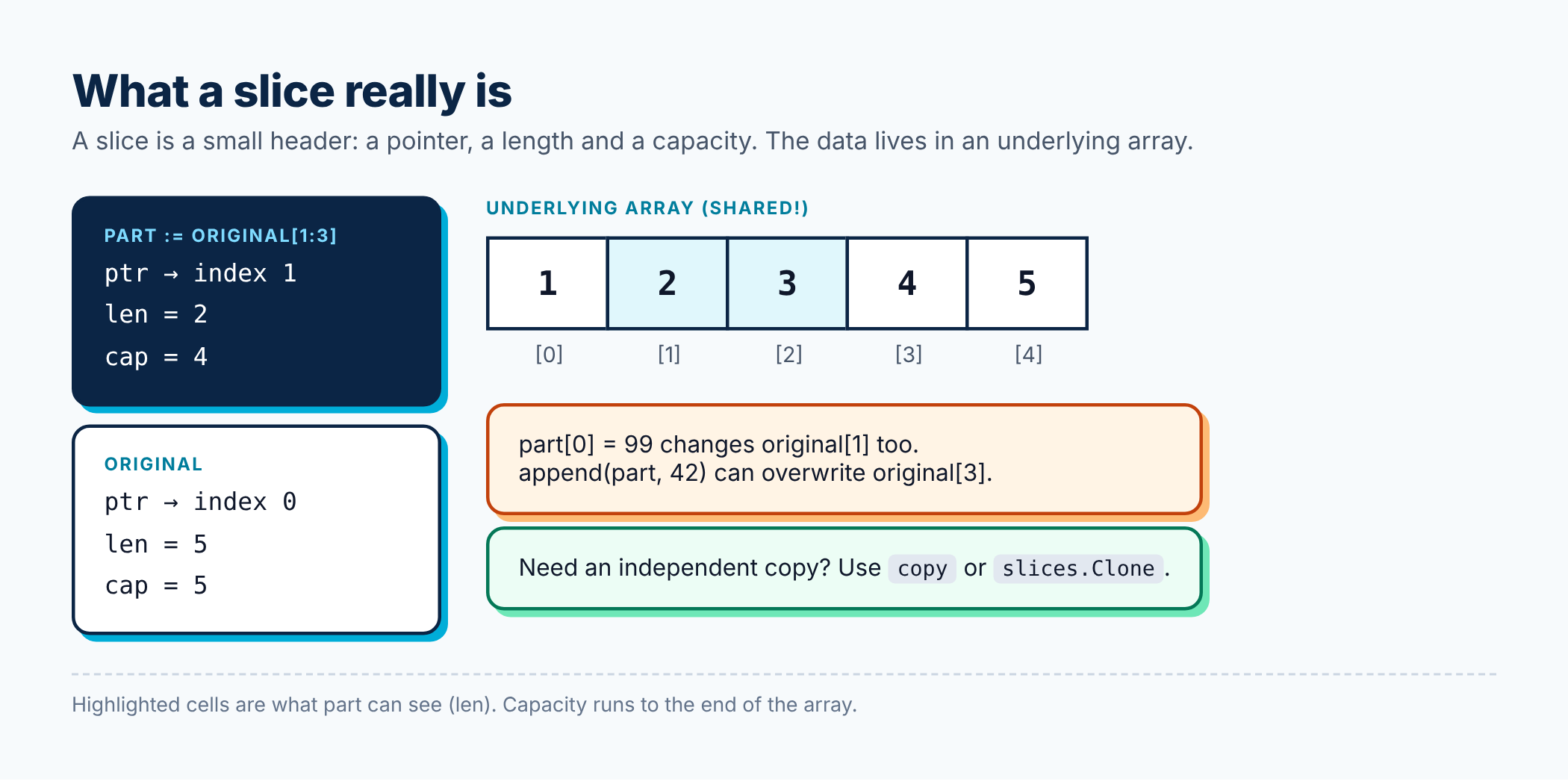
Because a slice is just a pointer plus two numbers, copying a slice or slicing it again is cheap. It also means two slices can share the same underlying array. That’s where surprises come from:
package main

import "fmt"

func main() {
    original := []int{1, 2, 3, 4, 5}
    part := original[1:3] // [2 3], shares memory with original

    part[0] = 99
    fmt.Println(original) // [1 99 3 4 5]  <- original changed too!

    // append into part can overwrite original's elements,
    // because part still has spare capacity in the same array
    part = append(part, 42)
    fmt.Println(original) // [1 99 3 42 5]

    // The fix: copy when you need an independent slice
    safe := make([]int, 2)
    copy(safe, original[1:3])
    safe[0] = -1
    fmt.Println(original[1], safe[0]) // 99 -1
}
If you take away one thing from this post, make it this: slicing does not copy. When you need an independent list, use copy, or slices.Clone from the standard library.
Handy tools from the slices package
Since Go 1.21, the slices package covers the everyday chores:
package main

import (
    "fmt"
    "slices"
)

func main() {
    nums := []int{5, 2, 8, 1}
    slices.Sort(nums)
    fmt.Println(nums)                     // [1 2 5 8]
    fmt.Println(slices.Contains(nums, 8)) // true
    fmt.Println(slices.Index(nums, 5))    // 2
    fmt.Println(slices.Max(nums))         // 8

    clone := slices.Clone(nums)
    clone[0] = 100
    fmt.Println(nums[0], clone[0]) // 1 100
}
nil slices vs empty slices
A slice declared with var s []int is nil. You can still call len on it (it’s 0), loop over it and append to it. So you almost never need to check for nil before using a slice. Just use it.
Maps: key-value lookups
A map stores values by key, like a dictionary.
package main

import (
    "fmt"
    "maps"
    "slices"
)

func main() {
    ages := map[string]int{
        "Asha": 29,
        "Ravi": 34,
    }
    ages["Meera"] = 25

    fmt.Println(ages["Asha"])   // 29
    fmt.Println(ages["Nobody"]) // 0, the zero value, not an error

    // the "comma ok" idiom tells you whether the key exists
    if age, ok := ages["Nobody"]; !ok {
        fmt.Println("not found")
    } else {
        fmt.Println(age)
    }

    delete(ages, "Ravi")
    fmt.Println(len(ages)) // 2

    // map iteration order is random on purpose; sort keys if order matters
    keys := slices.Sorted(maps.Keys(ages))
    for _, name := range keys {
        fmt.Println(name, ages[name])
    }
}
Three things to remember about maps:
- Reading a missing key returns the zero value. Use
value, ok := m[key]when “missing” and “zero” mean different things. - Iteration order is random. Go deliberately shuffles it so you don’t write code that accidentally depends on order.
- A nil map can be read but not written.
var m map[string]intthenm["x"] = 1will panic. Create maps with a literal ormake(map[string]int).
And one more for later: maps are not safe for concurrent writes. If several goroutines write to the same map, you need a lock. Part 8 shows how.
Structs: grouping related data
A struct bundles named fields together. It’s how you model things like a user or an order.
package main

import "fmt"

type Address struct {
    City    string
    Country string
}

type User struct {
    ID      int
    Name    string
    Email   string
    Active  bool
    Address Address // structs can contain other structs
}

func main() {
    u := User{
        ID:    1,
        Name:  "Asha",
        Email: "asha@example.com",
        Address: Address{
            City:    "Pune",
            Country: "India",
        },
    }
    u.Active = true
    fmt.Println(u.Name, u.Address.City)

    // fields you don't set get their zero values
    var empty User
    fmt.Printf("%+v\n", empty)
    // {ID:0 Name: Email: Active:false Address:{City: Country:}}

    // pointer to a struct: Go lets you use p.Name instead of (*p).Name
    p := &u
    p.Name = "Asha K"
    fmt.Println(u.Name) // Asha K
}
Use the Field: value form when creating structs. It keeps working if someone adds a new field later, and it’s much easier to read.
The %+v verb prints a struct with its field names. It’s my go-to for quick debugging.
Struct tags for JSON
You’ll often see backtick strings after struct fields. These are tags, and packages like encoding/json read them.
package main

import (
    "encoding/json"
    "fmt"
)

type Product struct {
    ID       int     `json:"id"`
    Name     string  `json:"name"`
    Price    float64 `json:"price"`
    Discount float64 `json:"discount,omitempty"` // left out when zero
    secret   string  // lowercase: not exported, so JSON ignores it
}

func main() {
    p := Product{ID: 7, Name: "Keyboard", Price: 2499, secret: "x"}
    data, _ := json.Marshal(p)
    fmt.Println(string(data))
    // {"id":7,"name":"Keyboard","price":2499}

    var decoded Product
    _ = json.Unmarshal([]byte(`{"id":8,"name":"Mouse","price":799}`), &decoded)
    fmt.Printf("%+v\n", decoded)
}
(We’re ignoring errors with _ here only to keep the example short. Don’t do that in real code. Part 5 explains why.)
Values vs references: a quick mental model
This is worth pausing on, because it’s a common source of confusion:
- Arrays and structs are values. Assigning or passing them copies all their data.
- Slices, maps and channels are small headers that point to shared data. Copying the header is cheap, and both copies see the same underlying data.
So if you pass a struct to a function and modify it, the caller won’t see the change unless you pass a pointer. If you pass a map and modify it, the caller will see it.
Best practices from this part
- Preallocate when you know the size.
make([]T, 0, n)avoids repeated growing and copying in a loop. - Always use the result of
append.s = append(s, x), every time. - Copy before you keep. If you store a slice that someone else might modify, store
slices.Clone(s). - Return empty results as
nilslices unless you need JSON to show[]instead ofnull. Both have length 0. - Use the comma-ok idiom for map lookups where a missing key matters.
- Never rely on map order. Sort the keys when you need a stable order.
- Use keyed struct literals like
User{Name: "Asha"}, not positional ones likeUser{1, "Asha", ...}.
Recap
- Arrays have a fixed size and are copied on assignment. You’ll rarely use them directly.
- Slices are a pointer, a length and a capacity. Slicing shares memory;
copyandslices.Clonedon’t. - Maps give you key-value lookups. Missing keys return the zero value, and order is random.
- Structs group fields. Tags control how they’re encoded to formats like JSON.
Try this: write a function that takes a []string of words and returns a map[string]int counting how often each word appears. Then print the words sorted by count.
In Part 4 we’ll give our structs behaviour with methods, and meet the feature that makes Go’s design so flexible: interfaces.
Where to go from here
⬅️ Previous: Part 2: Variables, Types, Control Flow, and Functions
➡️ Next: Part 4: Methods, Interfaces, and Composition
The full Go From Zero series
- Part 1: Why Go, Setting It Up, and Your First Program
- Part 2: Variables, Types, Control Flow, and Functions
- Part 3: Arrays, Slices, Maps, and Structs (you are here)
- Part 4: Methods, Interfaces, and Composition
- Part 5: Error Handling the Go Way
- Part 6: Packages, Modules, and Project Layout
- Part 7: Goroutines, Channels, and select
- Part 8: sync, context, and Concurrency Patterns
- Part 9: Generics Without the Headache
- Part 10: Testing, Benchmarks, and Fuzzing
- Part 11: Best Practices for Production-Ready Go
- Part 12: Building a REST API with the Standard Library
If this helped you, share it with a friend who is learning Go, or subscribe to get the next posts by email. Questions are welcome in the comments.
Releted Posts
Go From Zero, Part 2: Variables, Types, Control Flow, and Functions
This is Part 2 of 12 in Go From Zero, a beginner-to-production series on the Go programming language. If you missed it, Part 1: Why Go, Setting It Up, and Your First Program is the place to catch up.
Read more
Go From Zero, Part 1: Why Go, Setting It Up, and Your First Program
This is Part 1 of 12 in Go From Zero, a beginner-to-production series on the Go programming language. You are at the very beginning, which is a great place to be.
Read more
Go From Zero, Part 12: Building a REST API with the Standard Library
This is Part 12 of 12 in Go From Zero, a beginner-to-production series on the Go programming language. If you missed it, Part 11: Best Practices for Production-Ready Go is the place to catch up.
Read more