Go From Zero, Part 6: Packages, Modules, and Project Layout
This is Part 6 of 12 in Go From Zero, a beginner-to-production series on the Go programming language. If you missed it, Part 5: Error Handling the Go Way is the place to catch up.
So far, everything we’ve written has lived in one main.go file. That’s perfect for learning, but real projects have dozens or hundreds of files. Last time, in Part 5, we learned to handle errors cleanly. Today we zoom out and learn how Go organises code: packages, modules and project layout.
The good news: Go’s rules here are few and simple, and once you know them, every Go project you open will feel familiar.
Packages: Go’s unit of code
A package is a folder of .go files that all start with the same package line. Everything in that folder can see everything else in it, across files.
Two rules do most of the work:
- One folder = one package. All
.gofiles in a folder share a package name (test files are a small exception, covered in Part 10). - Capitalised names are exported.
func Total()can be used from other packages.func total()can’t. This applies to functions, types, struct fields, constants and variables.
Modules: a project with a name and dependencies
A module is a collection of packages that are versioned together. It’s defined by a go.mod file at the root. You met it briefly in Part 1:
mkdir shop && cd shop
go mod init github.com/yourname/shop
The module path, github.com/yourname/shop, is the import prefix for every package inside it. If you plan to publish the code, use the repository URL. If not, any name works, like example.com/shop or just shop.
Here’s what a go.mod looks like once a project has grown a bit:
module github.com/yourname/shop

go 1.24

require (
    github.com/google/uuid v1.6.0
)
Building a small multi-package project
Let’s build a tiny shop with a reusable pricing package. Here’s the layout:
shop/
├── go.mod
├── main.go
└── pricing/
    ├── pricing.go
    └── discount.go
pricing/pricing.go:
// Package pricing calculates order totals.
package pricing

// Item is a line in a shopping cart.
type Item struct {
    Name     string
    Price    int // in paise, to avoid float rounding
    Quantity int
}

// Subtotal returns the sum of price × quantity for all items.
func Subtotal(items []Item) int {
    total := 0
    for _, it := range items {
        total += it.Price * it.Quantity
    }
    return total
}
pricing/discount.go, in the same package, so it can use anything from pricing.go, exported or not:
package pricing

// ApplyDiscount applies a percentage discount, capped at maxPercent.
func ApplyDiscount(amount, percent int) int {
    return amount - amount*clamp(percent)/100
}

// clamp is unexported: only code inside package pricing can call it.
func clamp(percent int) int {
    const maxPercent = 50
    if percent > maxPercent {
        return maxPercent
    }
    if percent < 0 {
        return 0
    }
    return percent
}
And main.go uses it through the module path:
package main

import (
    "fmt"

    "github.com/yourname/shop/pricing"
)

func main() {
    cart := []pricing.Item{
        {Name: "Notebook", Price: 12000, Quantity: 2},
        {Name: "Pen", Price: 2500, Quantity: 4},
    }
    sub := pricing.Subtotal(cart)
    final := pricing.ApplyDiscount(sub, 80) // capped at 50%
    fmt.Printf("subtotal ₹%.2f, final ₹%.2f\n", float64(sub)/100, float64(final)/100)
    // subtotal ₹340.00, final ₹170.00
}
go run . from the shop folder runs it. Notice three things:
- The import path is
module path + folder, heregithub.com/yourname/shop/pricing. - You refer to things by the package name:
pricing.Subtotal. This is why good package names matter: they’re part of every call. main.gocan’t callpricing.clamp. The compiler simply won’t allow it.
Also note the money is stored as an integer in the smallest unit (paise or cents). That’s a real-world best practice: floats can’t represent most decimal amounts exactly, so never use them for money.
Adding a third-party dependency
Say we want unique IDs for orders. Add the import in your code, then let Go fetch it:
go get github.com/google/uuid@latest
package main

import (
    "fmt"

    "github.com/google/uuid"
)

func main() {
    id := uuid.New()
    fmt.Println("order id:", id)
}
This updates two files:
go.modgets arequireline with the version.go.sumrecords cryptographic checksums of every dependency, so nobody can quietly swap the code underneath you. Commit both files to git.
Commands you’ll use regularly:
go mod tidyadds anything you import but haven’t required, and removes anything you no longer use. Run it before every commit.go get pkg@v1.2.3pins a specific version.go get -u ./...updates dependencies.go list -m allshows every module your project depends on.
Go uses semantic versioning and a clever rule called minimal version selection: it picks the oldest version that satisfies everyone’s requirements, not the newest. That makes builds predictable. The same go.mod gives the same build today and next year.
The internal folder: privacy at the project level
Any package inside a folder named internal can only be imported by code rooted at the parent of that internal folder. It’s a way to say “this is shared within my project but is not a public API”.
shop/
└── internal/
    └── db/        # importable by shop/... but not by other modules
Use it generously. Anything outside internal that other people can import becomes something you have to keep stable.
A project layout that scales
There’s no official mandatory layout, and that’s on purpose. Start small and only add structure when you need it. Here’s a layout I’ve seen work well for services:
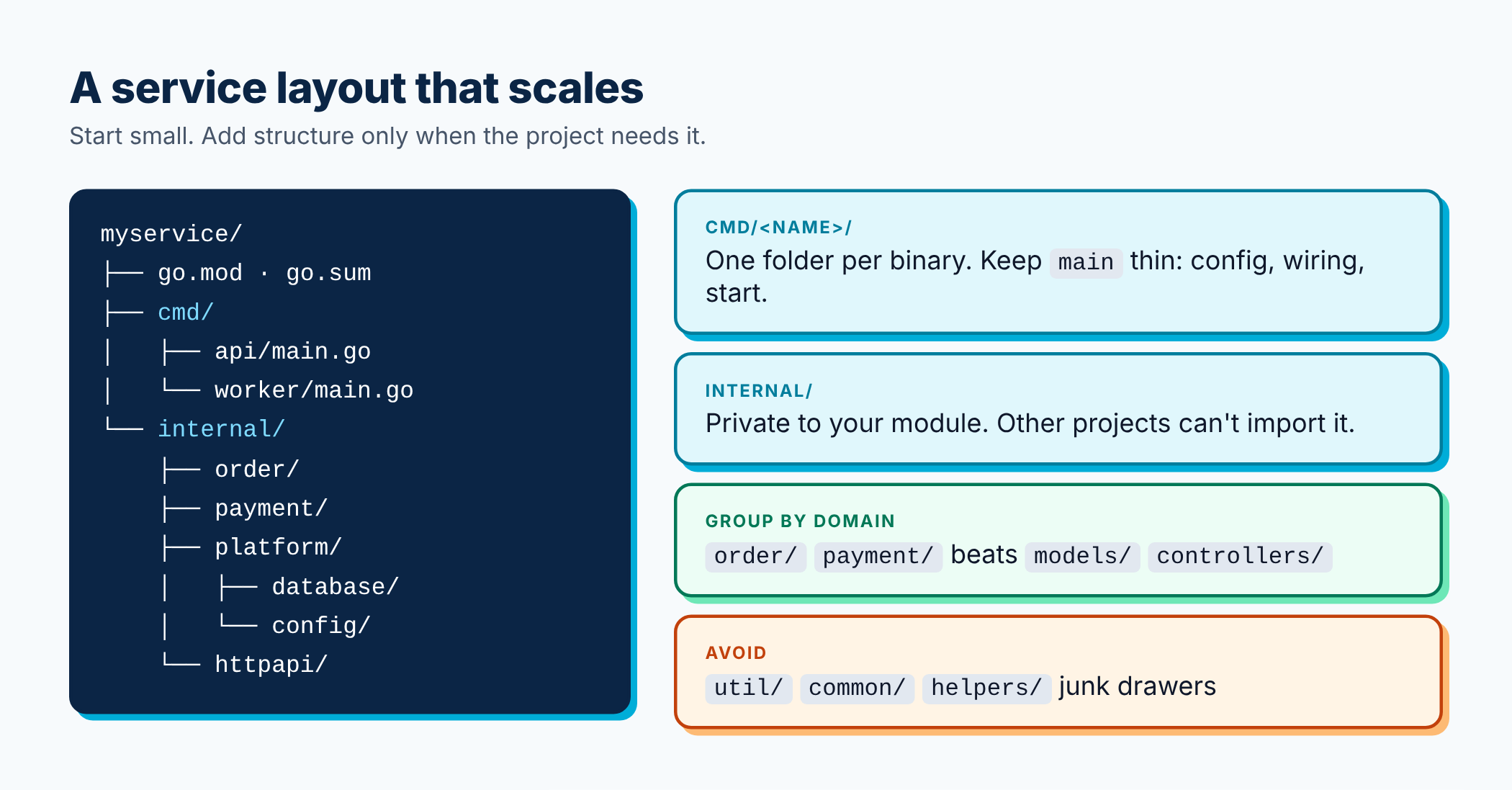
myservice/
├── go.mod
├── go.sum
├── cmd/
│   ├── api/
│   │   └── main.go        # the HTTP server binary
│   └── worker/
│       └── main.go        # a background worker binary
├── internal/
│   ├── order/             # business logic for orders
│   ├── payment/
│   ├── platform/
│   │   ├── database/
│   │   └── config/
│   └── httpapi/           # HTTP handlers, routing
└── README.md
cmd/<name>/main.goholds one folder per binary. Keepmainshort: read config, wire things together, start.internal/holds everything else, grouped by what it does in your business (order, payment), not by technical layer.
For a small tool or library, a single folder with a few files is perfectly fine. Please don’t create ten empty folders for a 200-line program because a template told you to.
Naming packages well
Package names are a big part of how Go code reads, so they deserve care.
- Short, lowercase, one word.
http,json,order,pricing. No underscores, no camelCase. - Avoid generic names like
util,common,helpers,miscormodels. They become junk drawers. Name a package after what it provides:strutilis better thanutil, and moving functions closer to where they’re used is even better. - Don’t stutter. Since callers write
pricing.Item, don’t name the typepricing.PricingItem. Likewise, preferorder.New()overorder.NewOrder()if it’s the main type. - Avoid import cycles. Go doesn’t allow package A to import B if B imports A. If you hit a cycle, it usually means a shared piece should move into its own smaller package, or one side should depend on an interface instead (Part 4).
Package documentation
A comment right above the package line becomes the package’s documentation, and comments above exported names document them. Start each comment with the name it describes:
// Package pricing calculates order totals, discounts and taxes.
package pricing

// Subtotal returns the sum of price × quantity for all items.
func Subtotal(items []Item) int { /* ... */ }
go doc ./pricing shows it in your terminal, and if the module is public, pkg.go.dev builds a website from it automatically. Free docs for writing good comments.
init functions: use with care
A package can have func init(), which runs automatically before main. It’s tempting for setup work, but it runs implicitly and makes testing harder. Prefer explicit setup in main that you can see and control. Reserve init for very small, side-effect-free registrations.
Best practices from this part
- One module per repository is the normal case. Multi-module repos are possible but add complexity.
- Commit
go.modandgo.sum, and rungo mod tidybefore committing. - Organise by domain, not by layer.
order/,payment/beatscontrollers/,models/,services/. - Put non-public code under
internal/. - Keep
mainthin. Wiring only; logic lives in packages you can test. - Be choosy with dependencies. Each one is code you now maintain. The standard library covers a lot.
- Write doc comments on every exported name.
Recap
- A package is a folder of
.gofiles with the same package name. - A module is a versioned set of packages, defined by
go.mod. - Import paths are the module path plus the folder path.
go get,go mod tidyandgo.sumhandle dependencies safely and reproducibly.internal/keeps code private to your project.- Short, specific package names make all your code read better.
Try this: take the word-counter from Part 3’s exercise and move the counting logic into a wordcount package with an exported Count(text string) map[string]int function and a doc comment. Call it from main and view the docs with go doc.
Now that we can organise code, it’s time for the feature Go is most famous for. In Part 7, we’ll run things at the same time with goroutines and channels.
Where to go from here
⬅️ Previous: Part 5: Error Handling the Go Way
➡️ Next: Part 7: Goroutines, Channels, and select
The full Go From Zero series
- Part 1: Why Go, Setting It Up, and Your First Program
- Part 2: Variables, Types, Control Flow, and Functions
- Part 3: Arrays, Slices, Maps, and Structs
- Part 4: Methods, Interfaces, and Composition
- Part 5: Error Handling the Go Way
- Part 6: Packages, Modules, and Project Layout (you are here)
- Part 7: Goroutines, Channels, and select
- Part 8: sync, context, and Concurrency Patterns
- Part 9: Generics Without the Headache
- Part 10: Testing, Benchmarks, and Fuzzing
- Part 11: Best Practices for Production-Ready Go
- Part 12: Building a REST API with the Standard Library
If this helped you, share it with a friend who is learning Go, or subscribe to get the next posts by email. Questions are welcome in the comments.
Releted Posts
Go From Zero, Part 5: Error Handling the Go Way
This is Part 5 of 12 in Go From Zero, a beginner-to-production series on the Go programming language. If you missed it, Part 4: Methods, Interfaces, and Composition is the place to catch up.
Read more
Go From Zero, Part 4: Methods, Interfaces, and Composition
This is Part 4 of 12 in Go From Zero, a beginner-to-production series on the Go programming language. If you missed it, Part 3: Arrays, Slices, Maps, and Structs is the place to catch up.
Read more
Go From Zero, Part 3: Arrays, Slices, Maps, and Structs
This is Part 3 of 12 in Go From Zero, a beginner-to-production series on the Go programming language. If you missed it, Part 2: Variables, Types, Control Flow, and Functions is the place to catch up.
Read more