Go From Zero, Part 7: Goroutines, Channels, and select
This is Part 7 of 12 in Go From Zero, a beginner-to-production series on the Go programming language. If you missed it, Part 6: Packages, Modules, and Project Layout is the place to catch up.
This is the part many people come to Go for. In Part 6 we learned how to organise code into packages. Now we’ll make that code do several things at the same time.
Concurrency has a reputation for being hard, and in many languages it is: threads, locks, callbacks, thread pools. Go makes it approachable with two simple tools: goroutines to run things concurrently and channels to let them talk to each other.
Concurrency is not parallelism
Quick but important distinction, popularised by Rob Pike:
- Concurrency is about dealing with many things at once. It’s how you structure a program.
- Parallelism is about doing many things at once. It’s about execution on multiple CPU cores.
Think of a single barista juggling five orders: steam milk for one, grind beans for another, take a payment. That’s concurrency. Two baristas working side by side is parallelism. Go lets you write concurrent code, and the runtime spreads it across your CPU cores for parallelism automatically.
Goroutines: just add go
A goroutine is a function running concurrently with the rest of your program. You start one by putting go before a function call.
package main

import (
    "fmt"
    "time"
)

func say(msg string) {
    for i := range 3 {
        fmt.Println(msg, i)
        time.Sleep(10 * time.Millisecond)
    }
}

func main() {
    go say("goroutine") // runs concurrently
    say("main")         // runs in the main goroutine
}
Run it and you’ll see the two outputs interleaved. Run it again and the order may change. That’s concurrency: you don’t control the exact timing.
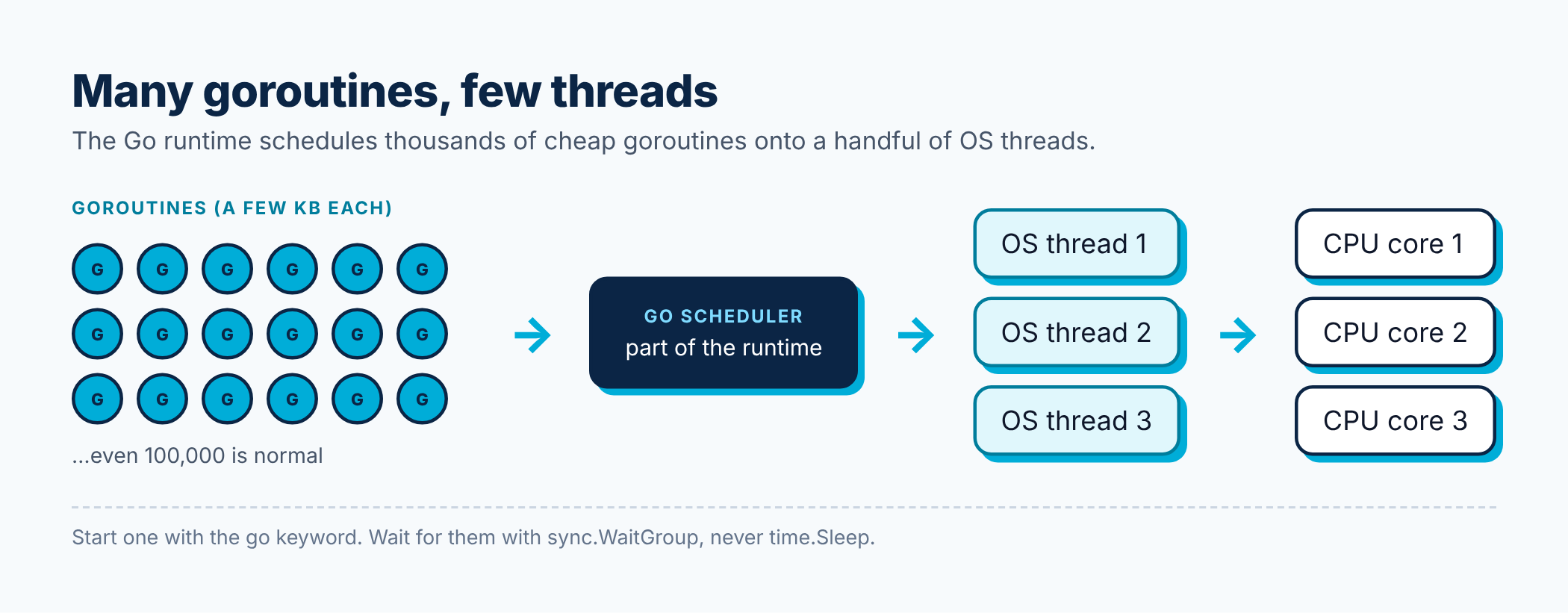
Goroutines are extremely cheap. A thread in most languages reserves about a megabyte of memory. A goroutine starts with a few kilobytes and grows as needed. Spinning up 100,000 goroutines on a laptop is completely normal. The Go runtime has its own scheduler that multiplexes all these goroutines onto a small number of OS threads.
The catch: main doesn’t wait
When main returns, the program exits, even if goroutines are still running. Try this:
package main

import "fmt"

func main() {
    go fmt.Println("will I print?")
    // main returns immediately; the goroutine probably never runs
}
Using time.Sleep to “wait a bit” is a hack, and it breaks the moment something takes longer than you guessed. The proper fix is sync.WaitGroup:
package main

import (
    "fmt"
    "sync"
)

func main() {
    var wg sync.WaitGroup

    for i := 1; i <= 3; i++ {
        wg.Add(1)
        go func() {
            defer wg.Done()
            fmt.Println("worker", i, "done")
        }()
    }

    wg.Wait() // blocks until every Done() has been called
    fmt.Println("all workers finished")
}
Add(1) before starting each goroutine, Done() when it finishes (deferred, so it always runs), and Wait() to block until the counter reaches zero.
A note for older tutorials: before Go 1.22, using the loop variable i inside a goroutine like this was a famous bug, because all goroutines shared the same i. Since Go 1.22, each loop iteration gets its own copy, so the code above is correct.
Channels: pipes between goroutines
A channel is a typed pipe. One goroutine sends values in, another receives them out. The Go proverb sums up the philosophy:
Don’t communicate by sharing memory; share memory by communicating.
Instead of several goroutines poking at the same variable (and needing locks), you pass data through channels so only one goroutine owns it at a time.
package main

import "fmt"

func main() {
    ch := make(chan string) // a channel of strings

    go func() {
        ch <- "hello from a goroutine" // send
    }()

    msg := <-ch // receive: blocks until a value arrives
    fmt.Println(msg)
}
The arrow shows the direction data flows. ch <- v sends into the channel; v := <-ch receives from it.
Unbuffered vs buffered channels
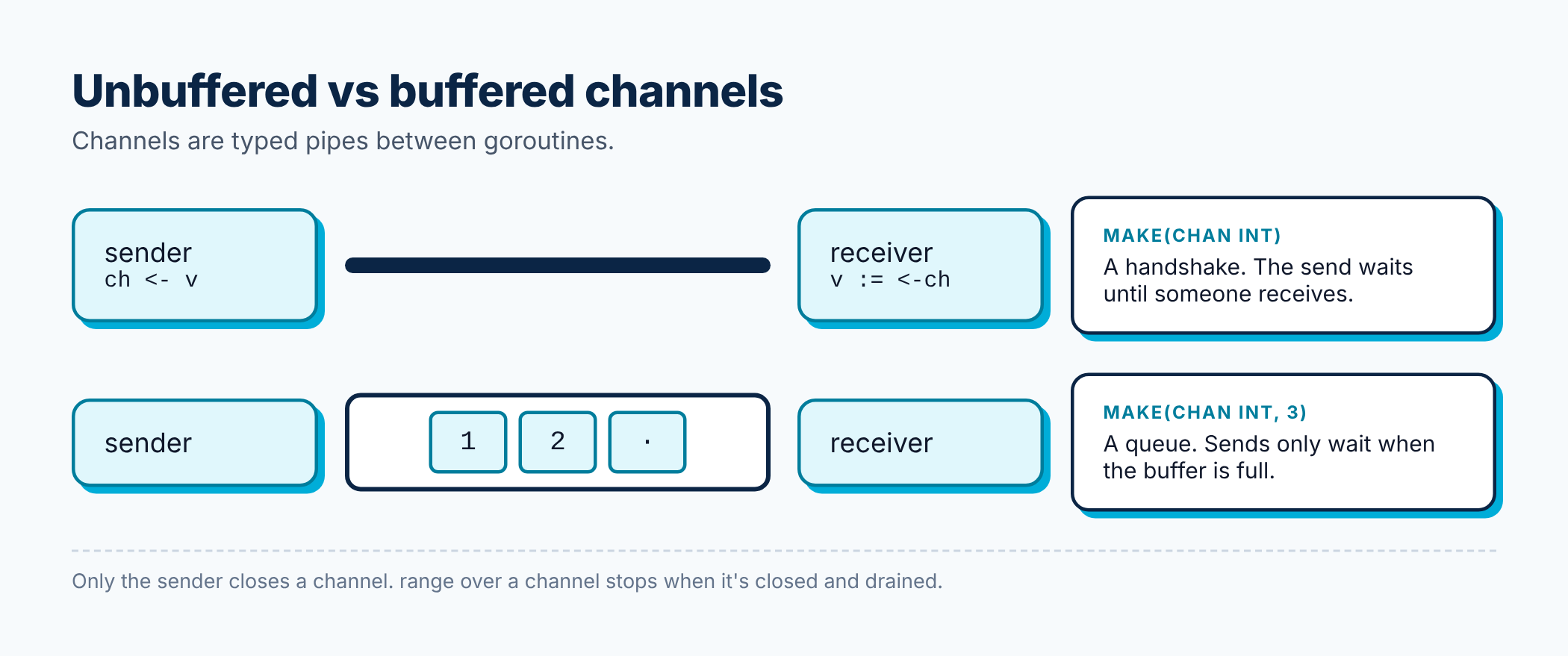
- Unbuffered (
make(chan int)): a send blocks until someone receives. It’s a handshake. Both sides meet at the same moment, which also synchronises them. - Buffered (
make(chan int, 3)): has room for 3 values. Sends only block when the buffer is full; receives only block when it’s empty.
package main

import "fmt"

func main() {
    jobs := make(chan int, 3)
    jobs <- 1
    jobs <- 2
    jobs <- 3 // fine: buffer has room for 3
    // jobs <- 4 would block forever here, since nobody is receiving

    fmt.Println(<-jobs, <-jobs, <-jobs) // 1 2 3
}
Start with unbuffered channels. Add a buffer only when you have a specific reason, like smoothing out bursts, and choose its size deliberately.
Closing and ranging over channels
The sender can close a channel to say “no more values are coming”. Receivers can range over a channel, and the loop ends when it’s closed and drained.
package main

import "fmt"

func generate(n int) <-chan int { // returns a receive-only channel
    out := make(chan int)
    go func() {
        defer close(out) // always close when done sending
        for i := 1; i <= n; i++ {
            out <- i
        }
    }()
    return out
}

func main() {
    for v := range generate(5) {
        fmt.Print(v, " ")
    }
    fmt.Println()

    // the comma-ok form tells you if a channel is closed
    ch := make(chan int)
    close(ch)
    v, ok := <-ch
    fmt.Println(v, ok) // 0 false
}
Rules worth memorising:
- Only the sender closes a channel, never the receiver.
- Sending on a closed channel panics. Receiving from a closed channel returns the zero value immediately.
- You don’t have to close every channel. Close it when receivers need to know that no more data is coming, for example to end a
rangeloop.
Directional channel types
Notice <-chan int in the example above. You can restrict a channel to send-only (chan<- int) or receive-only (<-chan int) in function signatures. The compiler then stops you from, say, accidentally closing a channel you’re only supposed to read. It’s free safety and makes intent obvious.
select: waiting on several channels at once
select is like a switch for channels. It waits until one of its cases can proceed, then runs that one.
package main

import (
    "fmt"
    "time"
)

func main() {
    fast := make(chan string)
    slow := make(chan string)

    go func() {
        time.Sleep(50 * time.Millisecond)
        fast <- "fast service answered"
    }()
    go func() {
        time.Sleep(500 * time.Millisecond)
        slow <- "slow service answered"
    }()

    for range 2 {
        select {
        case msg := <-fast:
            fmt.Println(msg)
        case msg := <-slow:
            fmt.Println(msg)
        case <-time.After(200 * time.Millisecond):
            fmt.Println("timed out waiting")
        }
    }
}
Output:
fast service answered
timed out waiting
The timeout case is a pattern you’ll use constantly: never wait forever on something that might not answer. A default case makes select non-blocking: if nothing is ready, run default immediately.
Putting it together: a concurrent URL checker
Let’s simulate checking several websites at once and collecting the results. Each “check” sleeps for a random time to mimic network latency.
package main

import (
    "fmt"
    "math/rand/v2"
    "time"
)

type result struct {
    url     string
    latency time.Duration
}

func check(url string) result {
    d := time.Duration(rand.IntN(100)) * time.Millisecond
    time.Sleep(d) // pretend this is an HTTP request
    return result{url: url, latency: d}
}

func main() {
    urls := []string{"go.dev", "github.com", "medium.com", "example.com"}
    results := make(chan result)

    start := time.Now()
    for _, u := range urls {
        go func() {
            results <- check(u)
        }()
    }

    for range urls { // we know exactly how many results to expect
        r := <-results
        fmt.Printf("%-12s %v\n", r.url, r.latency)
    }
    fmt.Println("total time:", time.Since(start).Round(time.Millisecond))
}
The total time is roughly the slowest single check, not the sum of all of them. That’s the payoff. Doing these one at a time would take up to four times as long.
Common mistakes (and how to avoid them)
1. Goroutine leaks. A goroutine blocked forever on a channel nobody will ever read is never cleaned up. It just sits in memory. Do this in a long-running server and memory grows until it crashes. Always know how each goroutine will end. Part 8 shows how context gives you a clean way to stop them.
2. Deadlocks. If every goroutine is waiting and nobody can proceed, Go detects it and crashes with fatal error: all goroutines are asleep - deadlock!. The usual cause is sending on an unbuffered channel with no receiver.
3. Data races. Two goroutines touching the same variable, with at least one writing, without synchronisation. The results are unpredictable. Go has a built-in detector. Use it:
go run -race .
go test -race ./...
Make -race part of your test routine. It has caught real bugs in every team I’ve worked with.
Best practices from this part
- Know how every goroutine ends before you start it.
- Use
sync.WaitGroupto wait for goroutines, nevertime.Sleep. - The sender closes the channel, and only when receivers need to know it’s done.
- Use directional channel types in function signatures.
- Prefer unbuffered channels until you have a reason for a buffer.
- Always have a timeout or cancellation path with
select. - Run tests with
-race. - Don’t add concurrency just because you can. Sequential code is easier to read and debug. Use goroutines when work is independent and actually benefits from overlapping, like I/O.
Recap
go f()starts a cheap, lightweight goroutine.sync.WaitGroupwaits for a group of goroutines to finish.- Channels pass values between goroutines. Unbuffered channels also synchronise them.
closesignals that no more values are coming, andrangereads until then.selectwaits on multiple channels and makes timeouts easy.- The race detector (
-race) finds concurrency bugs for you.
Try this: modify the URL checker so it gives up on any single check that takes longer than 50 ms, printing “timeout” for that URL instead. Hint: you’ll need a select with time.After inside each goroutine.
In Part 8, we’ll go further: protecting shared data with sync.Mutex, cancelling work with context, and real-world patterns like worker pools, fan-out/fan-in and pipelines.
Where to go from here
⬅️ Previous: Part 6: Packages, Modules, and Project Layout
➡️ Next: Part 8: sync, context, and Concurrency Patterns
The full Go From Zero series
- Part 1: Why Go, Setting It Up, and Your First Program
- Part 2: Variables, Types, Control Flow, and Functions
- Part 3: Arrays, Slices, Maps, and Structs
- Part 4: Methods, Interfaces, and Composition
- Part 5: Error Handling the Go Way
- Part 6: Packages, Modules, and Project Layout
- Part 7: Goroutines, Channels, and select (you are here)
- Part 8: sync, context, and Concurrency Patterns
- Part 9: Generics Without the Headache
- Part 10: Testing, Benchmarks, and Fuzzing
- Part 11: Best Practices for Production-Ready Go
- Part 12: Building a REST API with the Standard Library
If this helped you, share it with a friend who is learning Go, or subscribe to get the next posts by email. Questions are welcome in the comments.
Releted Posts
Go From Zero, Part 6: Packages, Modules, and Project Layout
This is Part 6 of 12 in Go From Zero, a beginner-to-production series on the Go programming language. If you missed it, Part 5: Error Handling the Go Way is the place to catch up.
Read more
Go From Zero, Part 5: Error Handling the Go Way
This is Part 5 of 12 in Go From Zero, a beginner-to-production series on the Go programming language. If you missed it, Part 4: Methods, Interfaces, and Composition is the place to catch up.
Read more
Go From Zero, Part 4: Methods, Interfaces, and Composition
This is Part 4 of 12 in Go From Zero, a beginner-to-production series on the Go programming language. If you missed it, Part 3: Arrays, Slices, Maps, and Structs is the place to catch up.
Read more