
Go From Zero, Part 5: Error Handling the Go Way
This is Part 5 of 12 in Go From Zero, a beginner-to-production series on the Go programming language. If you missed it, Part 4: Methods, Interfaces, and Composition is the place to catch up.
In Part 4 we learned about interfaces. Today you’ll see one of the most important interfaces in the whole language, and it has a single method:
type error interface {
    Error() string
}
That’s it. In Go, an error is just a value that can describe itself as a string. There are no exceptions to throw and nothing to catch. Functions that can fail return an error as their last result, and the caller decides what to do.
I’ll be honest: the first week, if err != nil everywhere felt repetitive. Then I had to debug a production incident in a codebase full of exceptions bubbling up from who-knows-where, and I understood the point. In Go, you can see every place that can fail just by reading the code.
The basic pattern
package main

import (
    "fmt"
    "os"
)

func main() {
    data, err := os.ReadFile("config.json")
    if err != nil {
        fmt.Println("could not read config:", err)
        return
    }
    fmt.Println("read", len(data), "bytes")
}
Call the function, check the error immediately, handle it, and keep the “happy path” running down the left side of the screen. Go developers call this keeping the happy path unindented.
// Less readable: the happy path is nested
if err == nil {
    if user.Active {
        // ... real work buried here
    }
}

// Idiomatic: handle problems early and return
if err != nil {
    return err
}
if !user.Active {
    return ErrInactive
}
// ... real work at the top level
Creating errors
There are two everyday ways to make an error:
package main

import (
    "errors"
    "fmt"
)

func main() {
    err1 := errors.New("something went wrong")
    err2 := fmt.Errorf("user %d not found", 42)
    fmt.Println(err1)
    fmt.Println(err2)
}
Style tip: error messages start with a lowercase letter and don’t end with punctuation. They often get joined together, like loading config: opening file: permission denied, and that reads nicely only if every piece follows the rule.
Sentinel errors: errors you can compare
Sometimes callers need to react to a specific error. For that, declare it once at package level. These are called sentinel errors, and by convention their names start with Err.
package main

import (
    "errors"
    "fmt"
)

var ErrNotFound = errors.New("not found")

var users = map[int]string{1: "Asha"}

func findUser(id int) (string, error) {
    name, ok := users[id]
    if !ok {
        return "", ErrNotFound
    }
    return name, nil
}

func main() {
    _, err := findUser(7)
    if errors.Is(err, ErrNotFound) {
        fmt.Println("show a 404 page")
    }
}
You’ve already used standard library sentinels without knowing it: io.EOF, sql.ErrNoRows, os.ErrNotExist and context.Canceled are all sentinel errors.
Wrapping: adding context without losing the original
Here’s the most important skill in Go error handling. When an error passes up through your code, each layer should add a little context about what it was trying to do. You do that with fmt.Errorf and the special %w verb.
package main

import (
    "errors"
    "fmt"
)

var ErrNotFound = errors.New("not found")

func queryDB(id int) error {
    return ErrNotFound
}

func loadProfile(id int) error {
    if err := queryDB(id); err != nil {
        return fmt.Errorf("loading profile %d: %w", id, err)
    }
    return nil
}

func handleRequest() error {
    if err := loadProfile(7); err != nil {
        return fmt.Errorf("handling /profile: %w", err)
    }
    return nil
}

func main() {
    err := handleRequest()
    fmt.Println(err)
    // handling /profile: loading profile 7: not found

    // %w keeps the chain, so errors.Is can still find the original
    fmt.Println(errors.Is(err, ErrNotFound)) // true
}
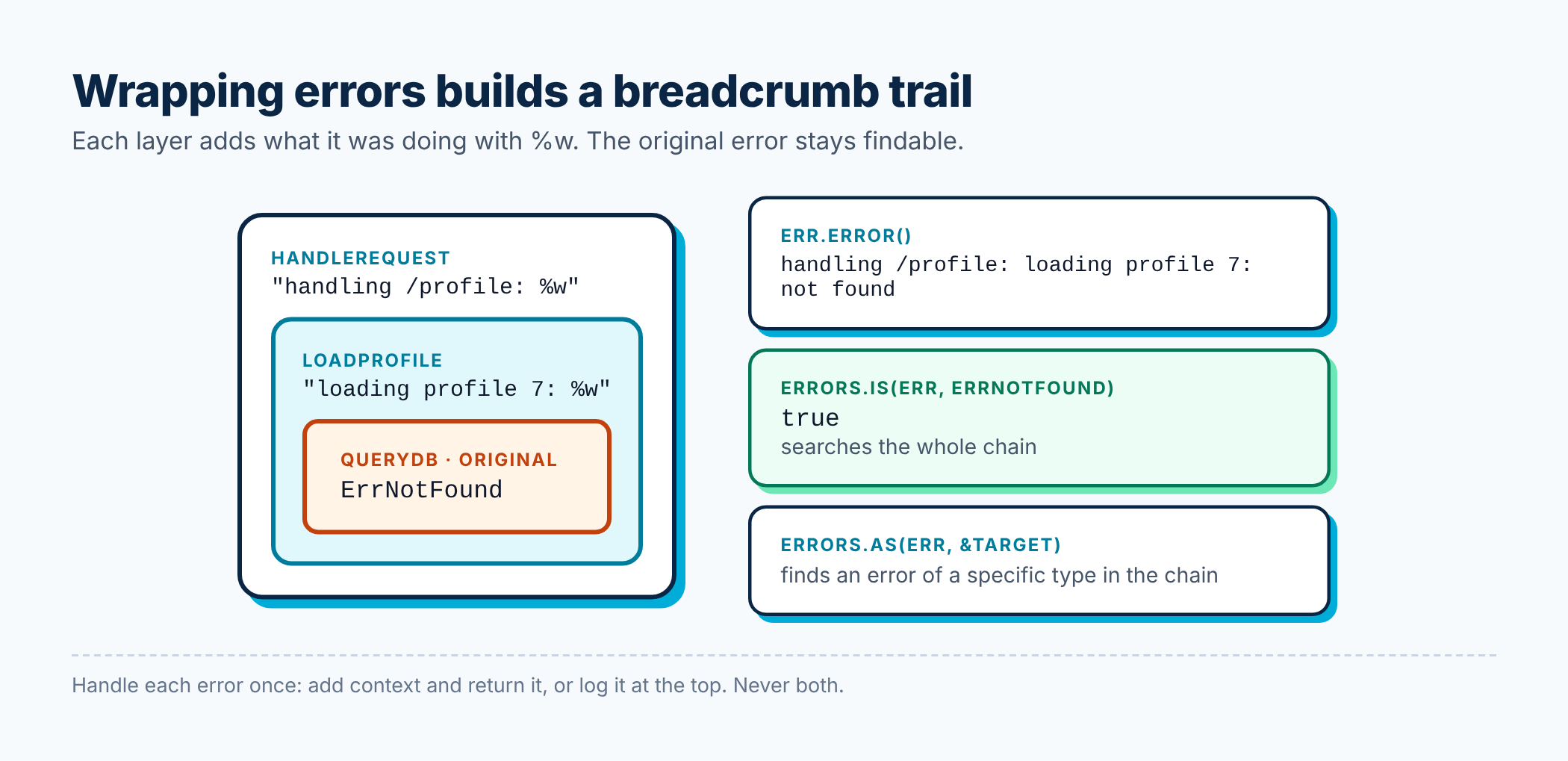
Look at that final message: handling /profile: loading profile 7: not found. It reads like a breadcrumb trail. When this shows up in your logs at 2 a.m., you’ll know exactly where to look, no stack trace needed.
%w vs %v: both put the error’s message into the new one. %w also keeps a link to the original so errors.Is and errors.As can find it. Use %w when callers might care about the underlying error, and %v when you deliberately want to hide an implementation detail.
Custom error types: errors that carry data
When callers need more than “which error”, like a field name or an HTTP status, make your own error type. Any type with an Error() string method is an error.
package main

import (
    "errors"
    "fmt"
)

type ValidationError struct {
    Field string
    Msg   string
}

func (e *ValidationError) Error() string {
    return fmt.Sprintf("%s: %s", e.Field, e.Msg)
}

func validateAge(age int) error {
    if age < 0 || age > 150 {
        return &ValidationError{Field: "age", Msg: "must be between 0 and 150"}
    }
    return nil
}

func register(age int) error {
    if err := validateAge(age); err != nil {
        return fmt.Errorf("register: %w", err)
    }
    return nil
}

func main() {
    err := register(200)

    // errors.As finds the first error in the chain of the given type
    var ve *ValidationError
    if errors.As(err, &ve) {
        fmt.Println("bad field:", ve.Field) // bad field: age
        fmt.Println("full error:", err)
    }
}
Quick summary of the two helpers:
errors.Is(err, target)asks: is this specific error somewhere in the chain? Use it with sentinels.errors.As(err, &target)asks: is there an error of this type in the chain? If so, give it to me. Use it with custom types.
Never compare wrapped errors with ==, and never check err.Error() strings. Both break as soon as someone adds context.
Joining multiple errors
Sometimes several things fail at once, like validating a form with many fields. errors.Join (Go 1.20+) combines them, and errors.Is still works on the result.
package main

import (
    "errors"
    "fmt"
)

var (
    ErrNameRequired  = errors.New("name is required")
    ErrEmailRequired = errors.New("email is required")
)

func validate(name, email string) error {
    var errs []error
    if name == "" {
        errs = append(errs, ErrNameRequired)
    }
    if email == "" {
        errs = append(errs, ErrEmailRequired)
    }
    return errors.Join(errs...) // returns nil if errs is empty
}

func main() {
    err := validate("", "")
    fmt.Println(err)
    fmt.Println(errors.Is(err, ErrEmailRequired)) // true
}
panic and recover: for truly broken situations
Go does have panic. It stops normal execution, runs deferred functions, and crashes the program unless something calls recover. But it’s not a replacement for errors.
Use panic only when something is so wrong that continuing makes no sense, usually a programmer mistake: an impossible state, a nil map write, or failing to load a required template at startup. Index out of range and nil pointer dereferences cause panics too.
package main

import "fmt"

func safeDivide(a, b int) (result int, err error) {
    defer func() {
        if r := recover(); r != nil {
            err = fmt.Errorf("recovered: %v", r)
        }
    }()
    return a / b, nil // dividing by zero panics
}

func main() {
    fmt.Println(safeDivide(10, 2))
    fmt.Println(safeDivide(1, 0))
}
recover only works inside a deferred function. In practice you’ll rarely write it yourself. HTTP servers use it so one bad request doesn’t crash the whole service, and that’s about the main legitimate use. Rule of thumb: libraries should not panic across their API. Return errors.
Best practices for error handling
These are the habits I look for in code reviews.
1. Handle each error exactly once. Either log it or return it, not both. If every layer logs and returns, a single failure shows up five times in your logs and nobody can tell what happened.
// Don't: logs AND returns, so it gets logged again upstream
if err != nil {
    log.Printf("query failed: %v", err)
    return err
}

// Do: add context and return; let the top level decide to log
if err != nil {
    return fmt.Errorf("querying orders: %w", err)
}
2. Add context that describes what you were doing, not that an error happened. "opening config file: ..." beats "error: failed: ...". Skip words like “failed to” since the fact that it’s an error already says that.
3. Never ignore errors silently. _ = doThing() should be rare and deliberate. If you truly don’t care, leave a comment explaining why.
4. Return nil explicitly when there’s no error. Remember the nil-interface gotcha from Part 4: never return a typed nil pointer as an error.
5. Use sentinels and custom types sparingly. They become part of your public API. Only export them when callers genuinely need to tell errors apart.
6. Don’t panic in libraries. Return errors and let the caller decide.
7. Check errors from Close() when writing. For files you write to, the error from Close can be the only sign that data didn’t make it to disk.
Recap
- An error is any value with an
Error() stringmethod. - Check errors immediately and keep the happy path unindented.
- Wrap with
fmt.Errorf("doing x: %w", err)to build a readable trail. - Use
errors.Isfor sentinel errors anderrors.Asfor custom error types. panicis for unrecoverable bugs, not ordinary failures.- Handle each error once: return it with context, or log it, never both.
Try this: write a function ParsePort(s string) (int, error) that returns a custom *PortError when the number is outside 1–65535, and wraps the error from strconv.Atoi with %w when the input isn’t a number. Test both cases with errors.As.
In Part 6, we’ll zoom out from individual files and learn how Go code is organised into packages and modules, how to add third-party dependencies, and how to lay out a real project.
Where to go from here
⬅️ Previous: Part 4: Methods, Interfaces, and Composition
➡️ Next: Part 6: Packages, Modules, and Project Layout
The full Go From Zero series
- Part 1: Why Go, Setting It Up, and Your First Program
- Part 2: Variables, Types, Control Flow, and Functions
- Part 3: Arrays, Slices, Maps, and Structs
- Part 4: Methods, Interfaces, and Composition
- Part 5: Error Handling the Go Way (you are here)
- Part 6: Packages, Modules, and Project Layout
- Part 7: Goroutines, Channels, and select
- Part 8: sync, context, and Concurrency Patterns
- Part 9: Generics Without the Headache
- Part 10: Testing, Benchmarks, and Fuzzing
- Part 11: Best Practices for Production-Ready Go
- Part 12: Building a REST API with the Standard Library
If this helped you, share it with a friend who is learning Go, or subscribe to get the next posts by email. Questions are welcome in the comments.
Releted Posts

Go From Zero, Part 4: Methods, Interfaces, and Composition
This is Part 4 of 12 in Go From Zero, a beginner-to-production series on the Go programming language. If you missed it, Part 3: Arrays, Slices, Maps, and Structs is the place to catch up.
Read more
Go From Zero, Part 3: Arrays, Slices, Maps, and Structs
This is Part 3 of 12 in Go From Zero, a beginner-to-production series on the Go programming language. If you missed it, Part 2: Variables, Types, Control Flow, and Functions is the place to catch up.
Read more
Go From Zero, Part 2: Variables, Types, Control Flow, and Functions
This is Part 2 of 12 in Go From Zero, a beginner-to-production series on the Go programming language. If you missed it, Part 1: Why Go, Setting It Up, and Your First Program is the place to catch up.
Read more